
Download CEPEM Mobile – exam scheduling, results viewing, medical exams, mobile app, healthcare convenience, on-the-go scheduling, secure results access, health app, appointment booking, medical test booking
Overview
CEPEM Mobile is a mobile application designed to streamline the process of scheduling medical exams and accessing test results. Developed by Agendamento e Resultado de Exames, the app operates within the Health & Fitness category and is available exclusively for Android devices. Its primary purpose is to eliminate the inefficiencies associated with traditional appointment booking methods, such as phone calls or in-person visits to healthcare facilities. By offering a digital alternative, CEPEM Mobile enables users to manage their medical appointments from any location with internet access.
The app targets individuals seeking a more convenient and organized approach to healthcare management, particularly those with busy schedules or limited access to medical centers. Real-world usage scenarios include patients preparing for routine check-ups, diagnostic tests, or follow-up procedures who wish to book appointments without delays. Additionally, users can view their exam results directly through the app, reducing the need for physical documentation or additional visits. The application supports secure login and private access to medical data, ensuring confidentiality during result retrieval.
While the developer did not provide additional information about the company’s background or broader product portfolio, the app’s functionality suggests a focus on digital healthcare accessibility. CEPEM Mobile represents a practical solution for users aiming to enhance their healthcare experience through mobile technology.
Key Features & Capabilities
- On-the-go exam scheduling: Users can select desired exam types, available dates, and preferred time slots directly within the app, allowing for immediate booking without external communication.
- Secure results viewing: After completing an exam, users can access their test results through a private, authenticated session, ensuring data privacy and confidentiality.
- Appointment reminders and notifications: The app sends timely alerts to help users avoid missing scheduled appointments, improving adherence to medical plans.
- User-friendly interface: Designed with intuitive navigation, the app simplifies the process of booking exams and reviewing results, reducing the learning curve for new users.
- Medical test booking integration: The application supports a range of diagnostic and screening procedures, enabling users to manage multiple test types through a single platform.
These features collectively enhance user control over healthcare logistics. For example, a patient can schedule a blood test on a weekend evening, receive a confirmation, and later view the results without visiting the clinic. The ability to share results with healthcare providers is supported through secure access, facilitating better-informed consultations. The app’s design prioritizes usability, making it accessible to users of varying technical proficiency.
User Interface, Workflow & Performance
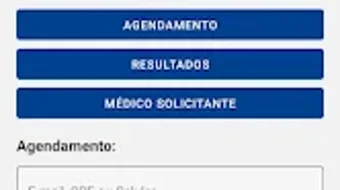
CEPEM Mobile features a clean, streamlined interface optimized for mobile interaction. Navigation is structured around core functions—scheduling, viewing results, and managing appointments—ensuring users can complete tasks with minimal steps. The layout emphasizes clarity, using consistent icons and labeled sections to guide users through each stage of the workflow.
Workflow efficiency is evident in the app’s ability to move users from selection to booking in a few taps. After logging in, users can browse available exam types, choose a date and time, and confirm the appointment without navigating through multiple layers. Similarly, result access follows a straightforward path: login → select exam → view report.
The developer did not specify resource usage details. Performance observations are based on general software behavior patterns. The app’s lightweight size of 21.5 MB suggests it is designed to operate efficiently on mid-range Android devices. Stability during typical usage is expected, though exact performance metrics were not provided. No information was shared regarding CPU or RAM consumption during operation.
Compatibility & System Requirements
CEPEM Mobile is compatible with Android operating systems and is available for download on the Google Play Store. The current version is 2.3.5, with an installation size of 21.5 MB. The app is designed to function on devices running the supported Android platform, though specific minimum OS versions were not listed.
Exact system requirements were not listed. Compatibility information was partially provided. Users should ensure their device meets the general standards for running Android applications, including sufficient storage and internet connectivity. The developer did not specify hardware requirements beyond the operating system and file size.
Pros and Cons
Pros
- Free to download and use, eliminating cost barriers for users.
- Enables convenient, mobile-based scheduling of medical exams.
- Offers secure access to personal medical test results.
- Provides timely reminders to help users stay on track with appointments.
- Intuitive interface suitable for non-technical users.
Cons
- Available only for Android, limiting access for iOS users.
- Exact system requirements were not specified, which may affect compatibility on older devices.
- Limited to a single platform, reducing cross-device accessibility.
- No information was provided about offline functionality.
- App availability is restricted to the Google Play Store, which may affect users in regions with restricted access.
FAQ Section
Is CEPEM Mobile available for iOS devices?
Currently, the app is only available for Android. There is no official iOS version released as of the latest update.
Is the app free to use?
Yes, CEPEM Mobile is available at no cost on the Google Play Store.
Does the app require an internet connection?
Yes, an active internet connection is required for scheduling appointments, viewing results, and receiving notifications.
Can I access my medical results without creating an account?
No, users must log in to their account to view exam results, ensuring secure and private access to personal data.
How often are app updates released?
Updates are released periodically by the developer to improve functionality and security, though specific update frequency was not disclosed.
Final Thoughts + CTA
CEPEM Mobile delivers a focused and practical solution for individuals seeking to manage medical appointments and access test results through a mobile device. Its emphasis on convenience, security, and ease of use makes it a valuable tool for users navigating routine healthcare needs. While the app is limited to Android and lacks detailed system specifications, its core functionality is well-executed and aligned with modern digital healthcare expectations.
Those who frequently schedule medical exams and value timely access to results will benefit most from this application. It reduces friction in the healthcare process, offering a reliable alternative to traditional booking methods. For users seeking a free, mobile-first approach to medical test management, CEPEM Mobile presents a compelling option.
Download CEPEM Mobile now







